
Skip to content
Pellenor

Get paid the way your customers want to pay

Customers pay by card, bank transfer, or financing, from their invoice or on your tech’s phone. You choose how the money reaches you.

  • From $59.97 a month
  • 14 days free
  • No card to start
  • Web, Android, and iOS
For your customers

Paying you is the easy part of their day

  1. Step 1

    You send the invoice

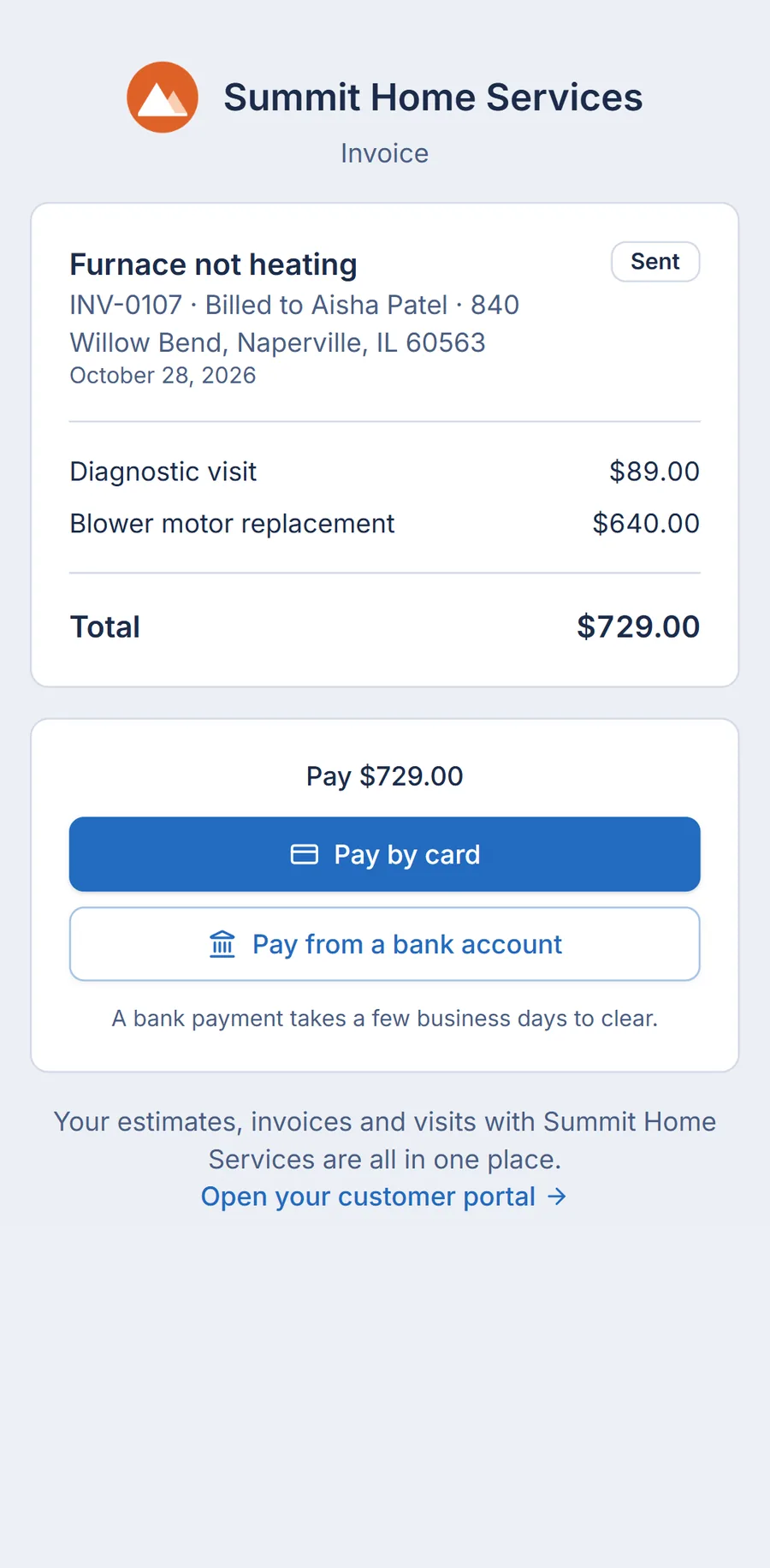
    Every invoice links to its own pay page, with your logo at the top.

  2. Step 2

    They pay by card, bank, or over time

    The customer picks card, bank transfer, or Pay over time through Sunbit or Klarna if you offer financing. A bank payment shows as on its way while it clears.

  3. Step 3

    Or they pay on the spot

    Your tech hands over the phone with the invoice’s pay page, taps the customer’s card on an Android phone, or takes cash or a check if you allow it.

  4. Step 4

    It’s recorded everywhere

    The invoice is marked paid, the customer is emailed a receipt, and the payment posts to QuickBooks.

An invoice on the customer’s phone, with the company’s logo: the work done, the total, and buttons to pay by card or from a bank account.
For you

Three ways to take payments

Pick the one that suits how you work. One of them takes your online payments at a time, and you can change it later in Settings.

Quickest to start

Managed payments

No Stripe account to run. Pellenor sets it up with a short guided form, and your balance and payouts show in Pellenor.

What it costs
3.5% + 30¢ per card payment, 1% up to $50 per bank payment, 3.3% + 15¢ per card tapped on a phone, 6.6% + 30¢ per financed payment, Stripe’s fees included
Payouts
Weekly, on Fridays

Your own Stripe account

A full Stripe account in your company’s name, with Stripe’s own dashboard and support. Connect the one you already have, or Pellenor opens one for you, and your invoices get Pay buttons.

What it costs
No Pellenor fee; Stripe bills you its own rates
Payouts
The schedule you set in Stripe

QuickBooks Payments

Already take payments in QuickBooks? Turn on QuickBooks Payments there, and your invoices carry its Pay link.

What it costs
No Pellenor fee; Intuit bills you its own rates
Payouts
Through QuickBooks Payments
Managed payments

How managed payments work

Payments are processed by Stripe, and Pellenor sets everything up. You see your balance and every payout without leaving Pellenor.

  1. 1

    Set it up from Settings

    An admin starts it under Settings, in Payments. Pellenor opens a Stripe account for your company, and Stripe asks for your business and bank details on its own secure pages.

  2. 2

    Customers pay the invoice amount

    Card, bank, or financing, online or on the spot. Your customer pays exactly what the invoice says; Pellenor’s fee comes out of the payment, never added to their bill.

  3. 3

    Payouts every Friday

    Payments collect in your balance and pay out to your bank weekly, on Fridays. With QuickBooks connected, each payout posts as one transfer that matches the deposit.

  4. 4

    Refunds and disputes

    Refund from the invoice. If a customer disputes a card payment, your billing team is emailed the deadline, and you answer through a link to your Stripe dashboard.

What it costs

Managed payment fees

Pellenor’s fee for managed payments, with examples
Invoice paidBy cardBy bank transferCard tapped on a phoneWith financing
Pellenor’s fee3.5% + 30¢1%, up to $503.3% + 15¢6.6% + 30¢
$250 invoice$9.05$2.50$8.40$16.80
$1,200 invoice$42.30$12.00$39.75$79.50
$8,000 invoice$280.30$50.00$264.15$528.30
  • The fee comes out of each payment before it reaches your bank, and includes Stripe’s own processing fees.
  • When you refund a payment, the fee isn’t returned.
  • Stripe charges a fee for each card dispute, which your company pays.
  • Managed payments accounts are subject to the Stripe Connected Account Agreement.
FAQ

Questions about payments

Which way of taking payments should I choose?

Managed payments is the quickest start: there’s no Stripe account to run yourself, and one fee covers Stripe’s. Choose your own Stripe account if you’d rather have Stripe’s full dashboard and pay Stripe directly; you can connect the one you already have. Choose QuickBooks Payments if you already take payments through QuickBooks. Customer financing works with either of the first two. You can change your mind later in Settings.

When does the money reach my bank?

Managed payments pay out to your bank weekly, on Fridays. With your own Stripe account, Stripe’s payout schedule applies, and with QuickBooks Payments, Intuit’s.

How do refunds work?

Refund from the invoice. Choose whether the refund lowers the bill or gives a payment back, and the customer is emailed. With managed payments, the fee on the original payment isn’t returned.

What happens if a customer disputes a card payment?

Your billing team is emailed with the deadline to respond, and the invoice reopens until it’s decided. With managed payments you answer from a link in Pellenor to your Stripe dashboard. Stripe charges a fee for each dispute, which your company pays.

How do my customers pay?

Every invoice has its own pay page, where customers pay by card or bank transfer, or over time if you offer financing. Your techs can take a card payment on the spot, from the pay page or by tapping the card on an Android phone, and your office records cash and checks. See Payments for the ways to set it up.

Can customers pay over time?

Yes, if you offer financing. On an invoice, a payment request, or a deposit, customers choose Pay over time and pay through Sunbit or Klarna, on the lender’s own site. You’re paid in full, and the lender collects from them. Klarna’s “as low as” monthly price can show under your estimate totals too.

Financing works with managed payments or your own Stripe account. With managed payments, Pellenor’s fee is 6.6% + 30¢ per financed payment, with Stripe’s own fees included, and your customer pays the same price however they pay.

Start taking payments with your first invoice

Start a 14-day free trial. No card needed: add your team, your services, and your first jobs.